
Vibe Building
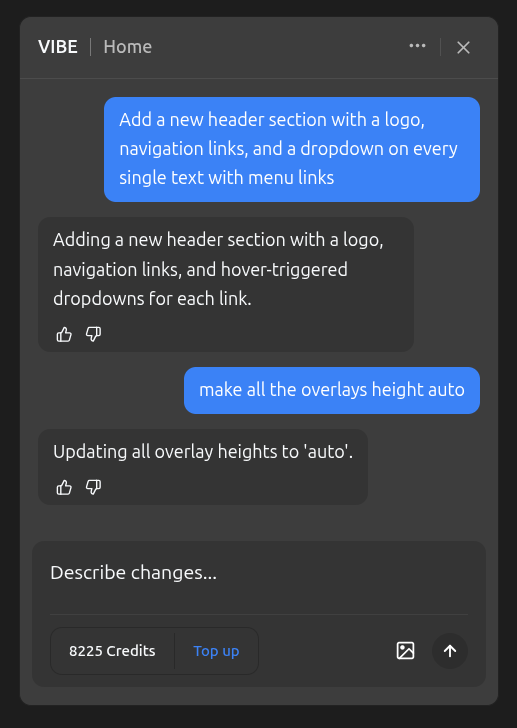
The Vibe Panel is a conversational AI assistant built directly into the builder. Instead of clicking through menus and adjusting properties manually, you can describe what you want in plain language and the AI will apply the changes to your design.
Opening the Vibe Panel
Click the Vibe icon in the left toolbar to open the panel. It appears as a draggable chat window you can position anywhere on your screen.
How It Works
- Type what you want in the message input — for example, "Make the hero section background dark blue with white text" or "Add a pricing section with three plans"
- The AI reads your current page, understands your design tokens (colors, fonts, spacing), and applies the changes directly
- You'll see the results immediately on your canvas
The Vibe Panel is context-aware. It knows which page you're on, what elements exist, what styles are applied, and what design tokens you've been using across your site. This means it can match your existing design language when creating new content.
Conversational
The panel keeps a conversation history per page, so you can build on previous requests. For example:
- "Add a testimonials section"
- "Make it three columns instead of two"
- "Change the background to match the hero section"
Each follow-up message understands what came before. The context goes up to the last 20 messages on the free plan, and can be increased with higher subscription plans.
Credits
Each AI message has a dynamic cost that depends on the complexity of the request — simple changes like updating a color cost as little as 1 credit, while generating a full page section can cost more. Clarification questions from the AI are always free. See Credits usage for details.
Clarification Questions
Sometimes the AI will ask for clarification before proceeding. For example, if you say "make it green" without prior context, it might ask clarifying questions about what exactly you want to make green. These clarification questions appear as clickable buttons — just pick an option to continue.